For starters I want to say, this class was essential to the growth of my digital knowledge. I grew up being someone really bad with using unfamiliar softwares and technology. Feeling like a blinded man left in a forest was the constant trope I dealt with while trying to attempt new technological skills. Another weakness of mine has been history. Throughout highschool I performed slightly average in history classes, being good with grasping timelines I did not experience was difficult, along with the memory portion of it. So stepping into this class was challenging for me off the bat, but I was caught by surprise. One of the issues of history I had was with grasping the relevance, but it was so obviously clear why we had to learn and teach details of slavery in todays world. It is so important to be frightened with tragic history to really comprehend the effects of systematic racism etc. I was captivated because I could really understand the importance, especially whilst we just had uproars of the Black Lives Matter protests. This was half of the battle for me, because I was very invested in what I was learning. The digital portion was the rest of the battle that I am proud of myself for pulling through. My favorite portfolio was text analysis assignment/computational text. I think it had to mainly do with my awe of how technology has made life easier for us. There are many parts of text analysis that make it super helpful as historians, the graphs, the cirrus, and bubble lines.
Basic idea of text analysis is seeking the main idea in a text without taking the time to read it just yet, it uses word count word patterns to tell us this. The time efficiency that comes with this tool is a huge game changer. Computers are obviously way faster when it comes to these things vs a manual research setting. You get to overlook thousands of documents at one time while using this system. You have the option to access the more relevant source to you because of the sorting system by word relevancy. The text analysis makes it so you only see documents that have the most repetitive pattern of the topic of your choice. The documents with the most common words show up first, so you aren’t wasting time reading things that are of little relevance to you. I have spent hours reading through long articles just to know my topic search was only mentioned once in the whole paper, and the articles focus is nowhere near what I actually need. I can see how this will assist you in finding articles that overlap and agree with each other. Not only articles that agree but articles who carry the same load of the topic. The mining dispatch shows us the hands-on benefits computational text analysis can have. Having a graph as a visual representation is the most helpful tool any researcher could ask for. The graph is what shows us what words show up the most in both topics . Imagine a human trying to recreate this skill, going through with annotations of word count would be a redundant and un time savvy task. I can’t imagine how many significant parts of history have been slept on because people did not have the same access to readings and mails and documents like we do now. Biased opinions, research that lacks the full picture, incorrect data.
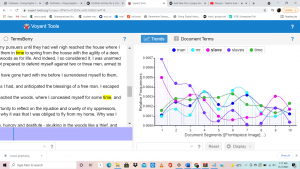
In portfolio 5 the verbal options were given to me was “man men slavery people race colored white free states god negro great country slave black state slaves government law liberty” . Using Voyant I was able to find out that the most common words were time (198); man (180); slave (179); slaves (176); mr (165).Throught this process I learned my favorite tool is the cirrus. This tool is basically a visual photo of jumbled words from the text, it uses the size of the text to explain how common the word is used in the text. This is so helpful because it takes one glance for a visual learner like me to grasp the essence of the text. In this cirrus for my task, I could see the word time were the most prominent following the word man.
The next best visual tool is the graph. The graph takes those main words, and attempts to show us where in the text they occur the most. Each main word is a different line on the graph, in a different color, the x axis divides the text into 10 different segments, and the y axis is the relative frequency. This is helpful because if one of the main words I am looking for, pops up a whole lot of times towards the very end of the text, that might not be as helpful, despite having the text a lot. In my task, I learned that the word “slaves” was used the most in segment one of the article, secondly the word in segment one was “slave”.
Next to that we see the actual pasted, but if we look more into it, you can hold your cursor over any word and it shows you the “document frequency”, or (how many times it shows up in the text). This is nice because, in all the other visuals, you only get to check the main words, but on this you can check ANY word you need. This tool is helpful even beyond the use of our need, I can imagine using this tool after writing a paper, to see how many times I used boring words, such as “good”.

Whilst breaking apart the specific benefits of text analysis, I am realizing that the real reason this was my favorite sector of the class is because it made so much sense to me. Not necessarily because it may have been the easiest for me to perform. But it made me understand too much, I could see it helping me beyond just this one assignment, which is why I am so happy I took this class. I will take these skills and apply them in all my further endeavors. Being a psychology major, with the need of writing many research and research papers. I will love to use text analysis tools to help me sift through the sea of articles.